Feature · Report
AI visibility report for ChatGPT, Gemini and Perplexity
By Maya Ellison, content lead · Updated 20 September 2026
In short
An AI visibility report is what a MentionChecker check gives you: one page with how often ChatGPT, Gemini and Perplexity mentioned your brand, who they mentioned instead, and every answer word for word. Share gives a link anyone opens without a login, and Export saves it as a PDF, Markdown or JSON. Your first check is free.
 Know where you stand in AI search.
What is an AI visibility report?
An AI visibility report is what a MentionChecker check gives you: one page that says how often the AI engines mentioned your brand when asked the questions people ask about what you do, who they mentioned instead, which websites the answers were built from, and every answer word for word. MentionChecker is a pay-as-you-go AI visibility checker. It asks ChatGPT, Google AI Overviews, Google AI Mode, Gemini, Perplexity and Microsoft Copilot the questions people ask about what you do, and tells you whether your brand is mentioned in the answers. A mention is an answer with your brand in it, and an AI citation is a page an AI engine lists under its answer as its source. The What is AI visibility page defines the term the report measures.
Every report has Share, which copies a shareable link anyone opens without a login, and Export, which saves it as a PDF, Markdown or JSON, and every check stays in History as the report it was on the day it ran. An agency sends each client their own link from one account, on the AI visibility agency tool page.
What does an AI visibility report show?
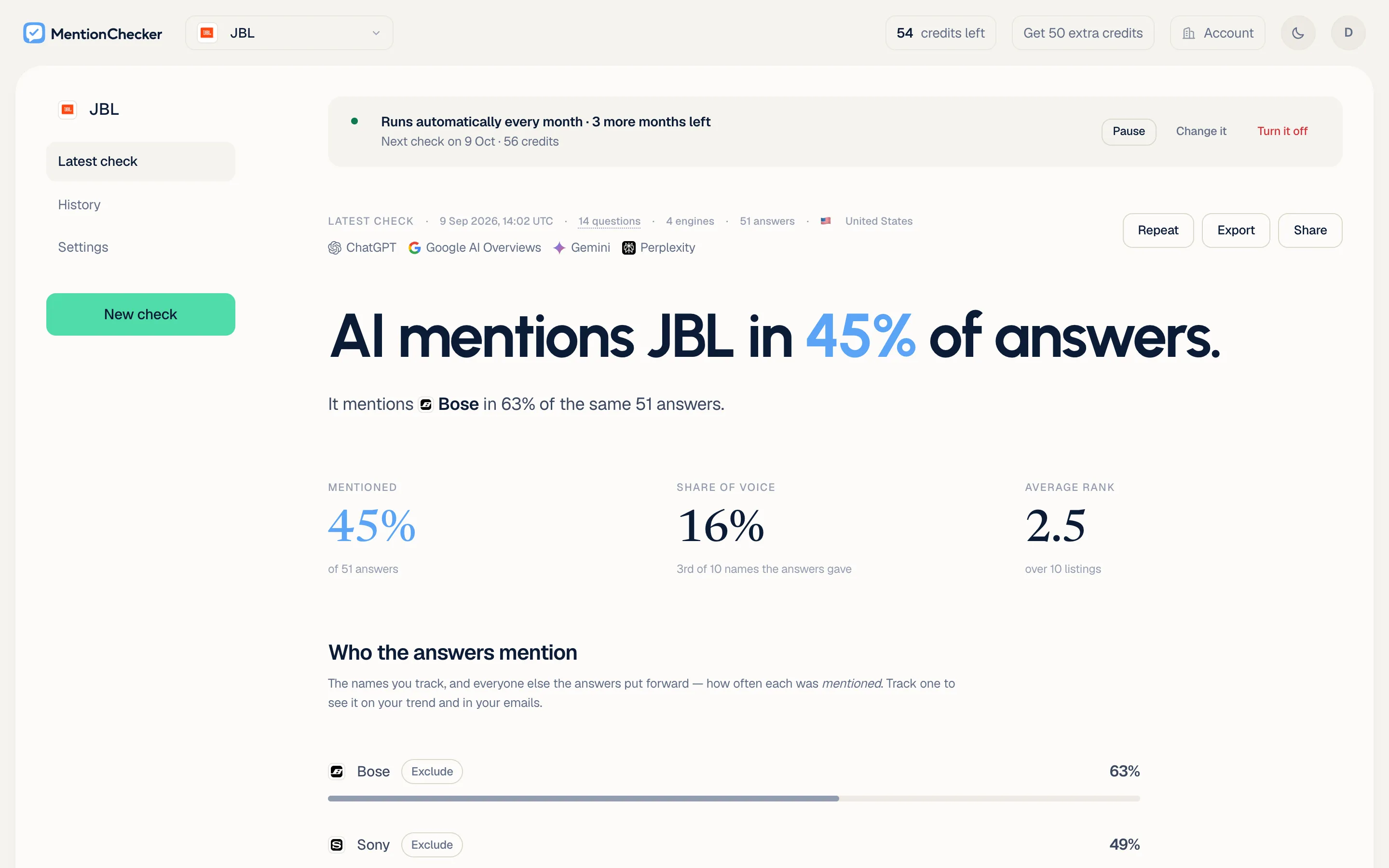
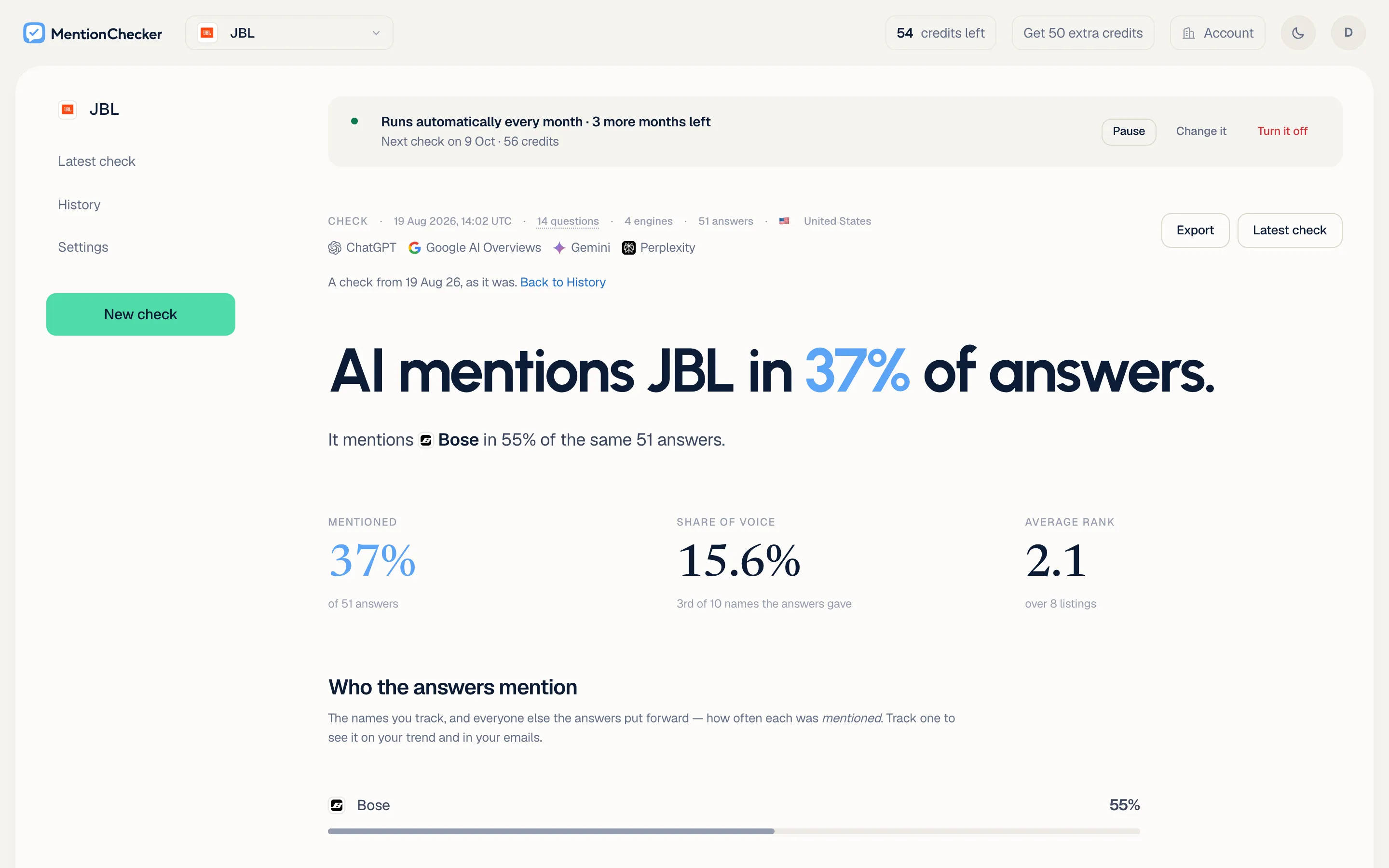
An AI visibility report shows seven things, in this order: when the check ran and what it asked, the headline, the three numbers (how often you were mentioned, your AI share of voice and your average rank), the standings, the names mentioned where you were not, the sources, and every question with every answer.
| On the report | What it says |
|---|---|
| The first line | When the check ran, in UTC, how many questions on how many AI engines gave how many answers, and the country it was asked from, with the AI engines named under it |
| The headline | The share of the check's answers that mention you, in one sentence, with the one name mentioned more often than you under it, when there is one |
| The three numbers | Mentioned, AI share of voice and average rank, each as the AI visibility score page counts it |
| Who the answers mention | Every name the answers mentioned, ranked by how many answers mentioned it, with your row marked, the standings the AI rank tracker page describes |
| Mentioned instead of you | The names mentioned in the answers you were not in |
| What the answers were built from | Every website the answers cited, the most cited first, your site marked, with a view of the exact pages, as the AI citation checker page describes |
| Every question | Each question with the AI engines that answered it and how many of those answers mentioned you, opening to each answer word for word with the pages it cited under it |
Which AI engines does an AI visibility checker cover?
An AI visibility report covers six AI engines: ChatGPT, Google AI Overviews, Google AI Mode, Gemini, Perplexity and Microsoft Copilot. A check asks ChatGPT, Google AI Overviews, Gemini and Perplexity unless you change the pick, and Google AI Mode and Microsoft Copilot are there to tick when you set the check up. The three numbers count every AI engine's answers together, each answer is labelled with the AI engine that gave it, and History keeps one line per AI engine, so a rise on Perplexity is read apart from a fall on ChatGPT.
The count of answers on the first line is the answers that came back. Google's help page says an AI Overview appears in the results when its systems determine that generative AI can be especially helpful (Find information in faster & easier ways with AI Overviews in Google Search, read on 20 September 2026), so a question Google served no AI Overview for is recorded on the report as served no AI answer and left out of the count: in the screenshots 14 questions on four AI engines are 51 answers of the 56 asked for, because five came back with no AI Overview. The AI visibility tracking page takes the six AI engines one by one.
Is an AI visibility report shareable?
Yes. Press Share on the report and a link is copied, and anyone with it opens the report in their browser with no login and no account. The link is made for that check and shows that check for as long as it exists, so a report sent in August still reads as August's numbers in October, and pressing Share again on the same check gives the same link, so a link already sent on keeps working.
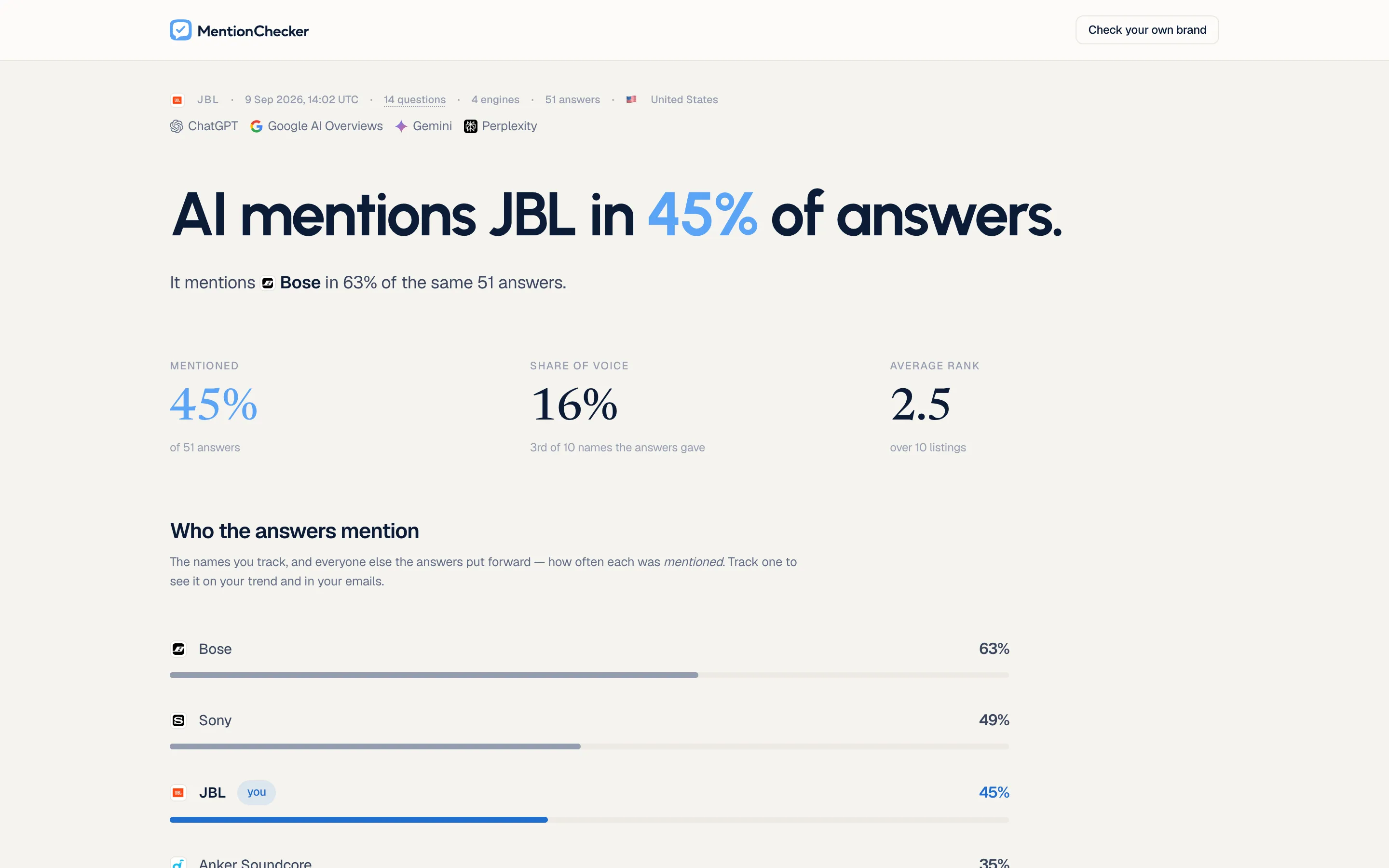
The address is random and cannot be guessed from the brand or the date, nothing on mentionchecker.com lists it, and the page tells search engines not to list it either. Pasted into Slack or an email, the link shows a preview card with the brand's name in its title and the report's own first two sentences, so a reader knows what it says before opening it.
Can I export an AI visibility report as a PDF?
Yes. Export saves the report as a PDF, Markdown or JSON. The PDF is the report as it is on screen under a letterhead with MentionChecker's mark and your brand's name: the headline, the three numbers, the standings, the sources and every answer you have opened, with nothing from the app around it, because a PDF goes to someone who never opens the app.
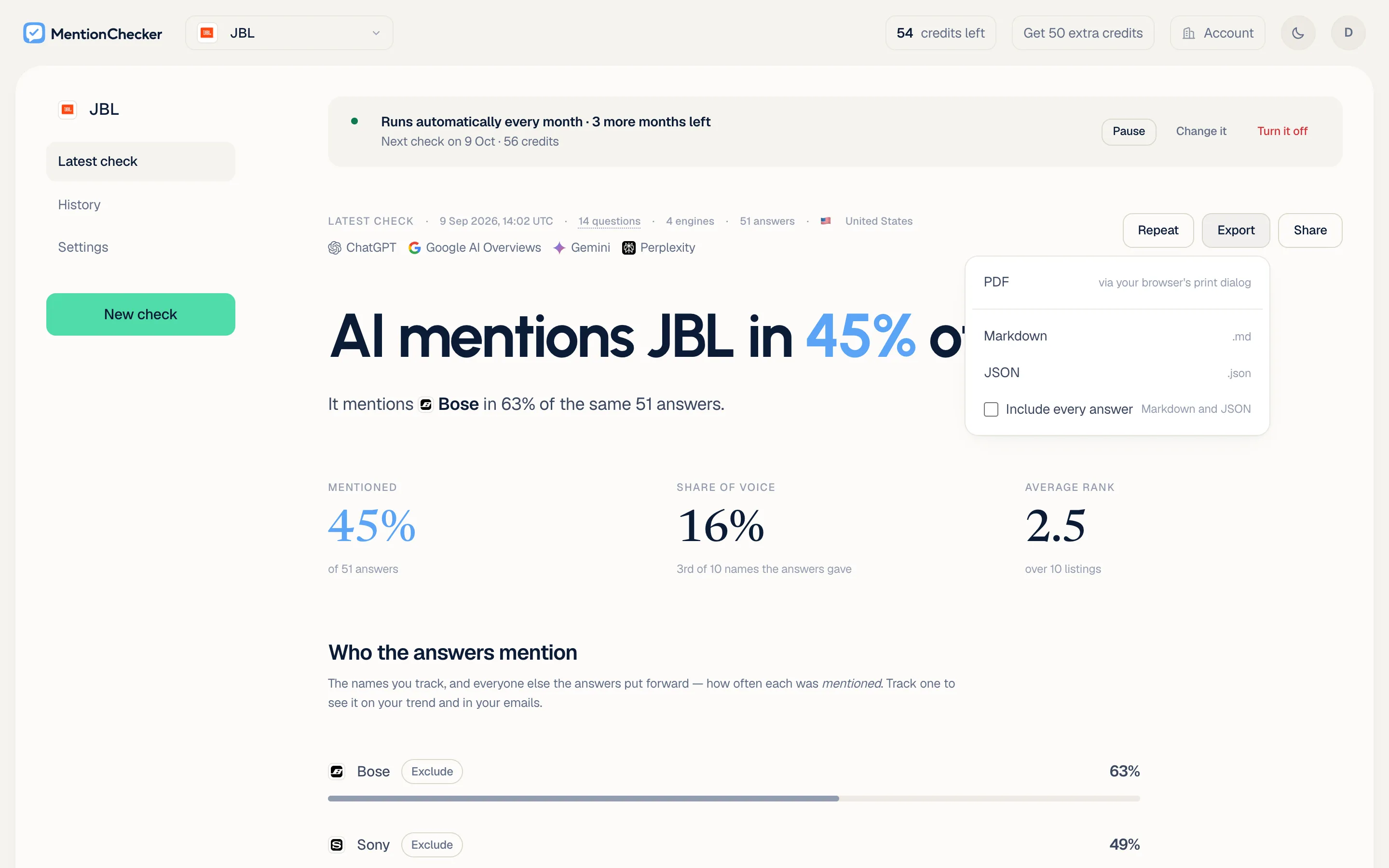
Markdown is the report as one text file, for a document, a ticket or a chat, and JSON is the same report as one data file for another program, and both carry the brand and the day of the check in their name. Tick Include every answer and both carry every answer in the report word for word, with the AI engine, the question, the names it mentioned and the pages it cited, on your own report only, the latest check and every past one.
Can I open a past AI visibility check?
Yes, every one. History lists every AI visibility check, newest first, and each opens as the report it was on the day it ran, with its own numbers, standings, sources and answers.
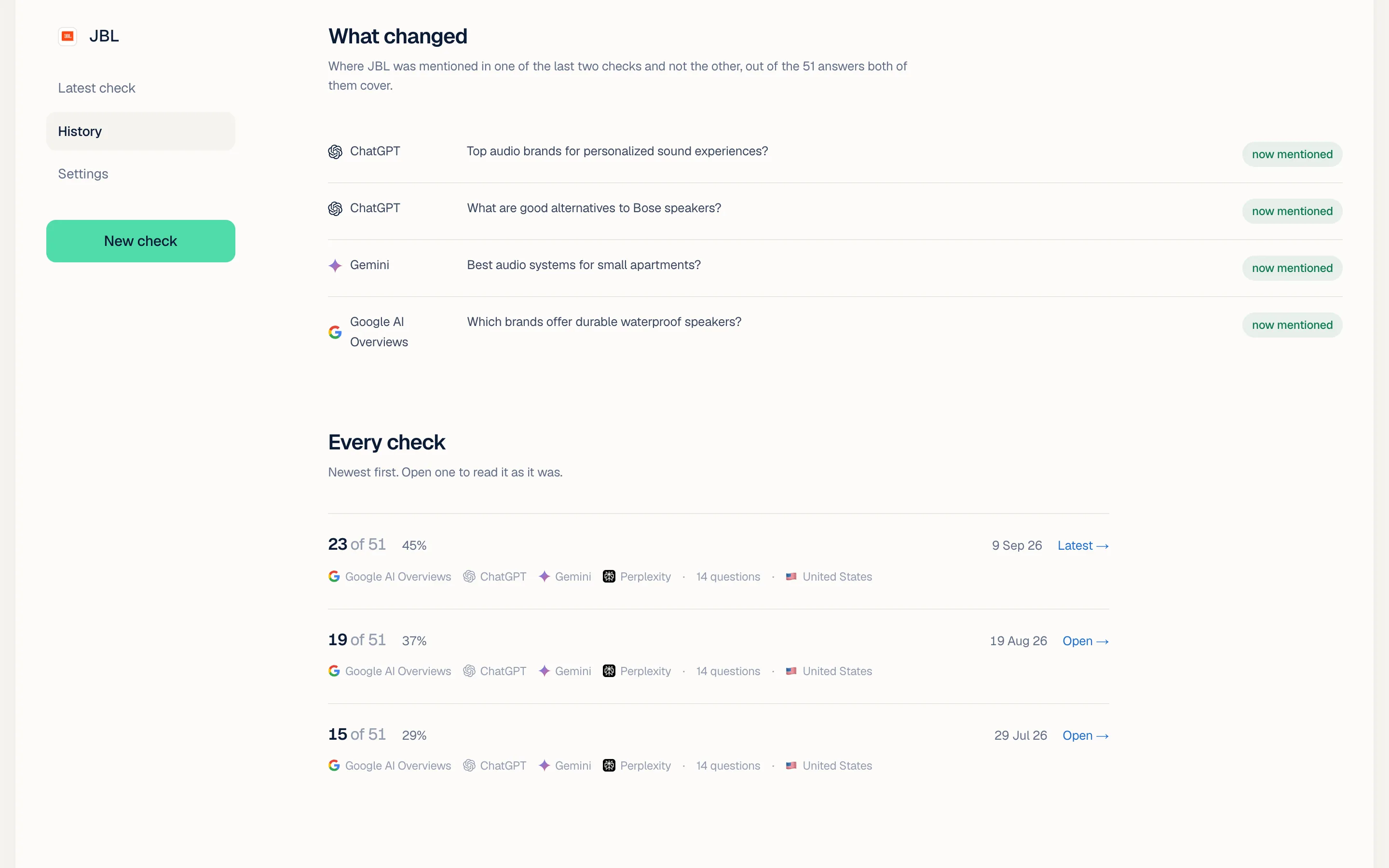
A past check exports as a PDF, Markdown or JSON as it was, and the link stays with the latest check, so a link never shows an older check's numbers as the current ones. History also counts what moved between the last two checks: every answer that mentioned you in one and not the other, with the AI engine and the question. The AI visibility tracking page describes the repeat that adds a report to History daily, weekly or monthly.
How do I get an AI visibility report?
An AI visibility report comes from one MentionChecker check: enter your website, approve or edit the questions the check proposes, pick the AI engines and the country, and run it. The report opens when the check finishes, with Share and Export on it from the first one. Your first check is free, no card: 5 questions on ChatGPT and Gemini.
- Enter your website. The check proposes questions from it, the ones people ask about what you do, and you approve, edit or add to them.
- Pick the AI engines and the country. ChatGPT, Google AI Overviews, Gemini and Perplexity are ticked to start, and the country is preselected from your web address.
- Run it. The report is on the brand's page when the check finishes, and every check after it, once or on a repeat, adds a report to History.
Every brand in an account has its own reports, so an agency checks every client from one account and sends each their own link. The guide to checking your ChatGPT visibility covers a first AI visibility check on ChatGPT alone, and the guides to checking your Gemini visibility, checking your Perplexity visibility, checking your Google AI Overviews visibility, checking your Google AI Mode visibility and checking your Copilot visibility cover the same check with Gemini, Perplexity, Google AI Overviews, Google AI Mode or Copilot selected.
What do I do when my AI visibility score is low?
Send the report to the person who asked, then open the answers you were not in. Each question on the report lists the AI engines that answered it and how many of those answers mentioned you, so the questions with none are the place to start, and the pages listed under those answers are the pages to read. The standings say which names those answers mentioned instead and how often, the field your AI share of voice is counted against, and the AI rank tracker page says how to read your place among them.
Then change something, on your own site or on the pages the answers cited, and run the same check again. History shows what moved: the three numbers with their movement against the check before, and every answer that started or stopped mentioning you.
How much does an AI visibility report cost?
An AI visibility report costs one credit for each question on each AI engine, asked once, and the link, the PDF, the exports and History cost nothing beyond that: 25 questions on the four AI engines a check asks by default is 100 credits, the smallest pack is 50 credits for $9, and your first check is free. There is no plan: the credits come from a pack bought once, and they last 12 months, the way a pay as you go AI visibility tracker is paid.
| What | Credits |
|---|---|
| 25 questions on ChatGPT, for example | 25 |
| The same 25 on the four engines a check asks by default, once | 100 |
| The smallest pack, $9 | 50 |
| The pack that is exactly one of those checks, $17 | 100 |
| Your first check, free, no card: 5 questions on ChatGPT and Gemini | 10 |
Prices as of 20 September 2026, read from the pricing page.
How does an AI visibility report compare with a screenshot of the chat?
A screenshot holds one answer from one AI engine on one day, and an AI visibility report holds every answer from every AI engine you picked and counts how many of them mentioned you. On 18 September 2026 we asked six AI engines for cosy puzzle games with no ads from the United States: the six answers ran to 1,826 words between them, the shortest 203 words and the longest 446. The report keeps each of the six under the question it answered.
A screenshot is also that day's answer. OpenAI's help page says ChatGPT may search the web when a question would benefit from current information, and that its results and citations can be incomplete, outdated or incorrect (Searching the web with ChatGPT, read on 18 September 2026). The answer ChatGPT gave on the day of the check is still in History to read after ChatGPT has changed it.
| What differs | A screenshot of one chat | A MentionChecker report |
|---|---|---|
| What it holds | One answer from one AI engine | Every answer from every AI engine you picked, with the counts |
| Who can open it | Whoever gets the image | Anyone with the link, no login, and anyone you send the PDF |
| The date | Whatever the picture shows | The day and time in UTC, the country and the AI engines, on the first line |
| Sending it on | The image | A link, a PDF, Markdown or JSON |
| The evidence | A picture of the answer | Every answer word for word, with the names it mentioned |
| Next month | Another screenshot | The same check again, daily, weekly or monthly, from your balance, and every past check as it was |
If you want to show someone one answer you have just read, a screenshot does that. Every line on the right is one AI visibility report, from $9.
What do people ask about an AI visibility report?
Is there a free AI visibility report?
Yes. Your first MentionChecker check is free, no card: 5 questions on ChatGPT and Gemini, and its report has Share and Export like every other, so the first report goes out as a link or a PDF the same day. After it, a report costs one credit per question per AI engine, and the smallest pack is 50 credits for $9 on the pricing page, read on 20 September 2026.
Why does an AI visibility report matter?
Because when an AI engine answers a question about what you do, the answer is what the person reads, and if it mentions three brands and yours is not one of them, that person does not see you. An AI visibility report from MentionChecker tells you which questions that is true for, in the answers themselves, and who was mentioned instead, so you read what ChatGPT, Gemini and Perplexity said about you instead of guessing.
How long does an AI visibility report take?
A MentionChecker report opens when the check finishes. A check of 14 questions on four AI engines from the United States ran for two minutes and 23 seconds on 9 September 2026 from the moment it started, and a repeat runs the same way and adds its report to History. Share and Export are on the report the moment it opens, and the shared link shows it as it is on that day.
Can someone open a shared report without an account?
Yes. Share on a MentionChecker report copies a link, and anyone with it opens the report in their browser with no login and no account: the headline, the three numbers, the standings, the sources list and every answer word for word. It is read-only, with a button to run a check of their own.
Does a shared report link change when I run a new check?
No. A MentionChecker report link is made for one check and shows that check for as long as it exists, so a report sent in August still reads as August's numbers in October. A new check is a new report with its own Share button, and pressing Share on the same check again gives the same link, so a link already sent on keeps working.
Is a shared report public?
A shared MentionChecker report opens for anyone who has the link, and for no one else. The address is random and cannot be guessed from the brand's name or the day of the check, nothing on mentionchecker.com lists it, and the page tells search engines not to list it either, so the report is as public as the people you send the link to.
What is in an AI visibility report PDF?
The PDF of a MentionChecker report is the report as it is on screen under a letterhead with MentionChecker's mark and your brand's name: the headline, the three numbers, the standings, the sources and every answer you have opened, with nothing from the app around it. It goes to someone who never opens the app, so it keeps the day and the country of the check on its first line and stands on its own.
Can I export AI visibility data as Markdown or JSON?
Yes. Export on a MentionChecker report saves it as Markdown, one text file for a document, a ticket or a chat, or as JSON, one data file for another program. Both carry the day and country the check ran, the AI engines, the three numbers, the standings with every name's mention rate, the sources and every question asked, and the JSON carries both sources lists, websites and exact pages.
Can I export the raw AI answers from a report?
Yes, from your own account. Tick Include every answer in the Export menu of a MentionChecker report and the Markdown and the JSON carry every answer in the report word for word, with the AI engine, the question, the names it mentioned and the pages it cited. The option is on the latest check and on every past check, and it is not on a shared link.
Does an AI visibility report show competitors?
The standings on every MentionChecker report rank every name the answers mentioned by how many answers mentioned it, with your row marked, and the headline carries the one competitor mentioned more often than you, when there is one. Mentioned instead of you lists the names in the answers you were not in. No list of competitors is needed from you, because the names come from the answers. The AI rank tracker page describes the standings.
How do I see what AI says about my brand?
In the answers themselves. Every answer is on a MentionChecker report word for word, under the question it answered and labelled with the AI engine that gave it, so what ChatGPT said about you is there in ChatGPT's own words, with the names it mentioned beside yours. The shared link carries the same answers, the PDF the ones you have opened, and the Markdown and JSON every one with Include every answer ticked.
Which sources do AI engines cite in their answers?
A MentionChecker report lists every website the answers were built from, the most cited first, with your own site marked, and a URLs view lists the exact pages the same way. The Markdown and JSON exports carry the sources list too. The AI citation checker page describes the list and what to do with the pages on it.
Which country is an AI visibility report asked from?
On 18 September 2026 ChatGPT listed eight cosy puzzle games from the United States and nine from the United Kingdom, and not one name was in both. A MentionChecker report names the country it was asked from on its first line, beside the day and time in UTC and the count of questions, AI engines and answers, on the owner's screen, on the shared link and in every export, and a brand checked from two countries gets one report and one History series per country.
Can I see past AI visibility reports?
Every check in History opens as the MentionChecker report it was on the day it ran, and Export on it gives the PDF, the Markdown and the JSON of that check as it was. Share is on the latest check only, so an older check is sent on as a file, and a link made when that check was the latest still opens it. The AI visibility tracking page describes the repeat that adds a check to History daily, weekly or monthly.
How often should I run an AI visibility report?
As often as you want to see what moved. A repeat runs the same MentionChecker check daily, weekly or monthly from your balance, adds each report to History, and History counts every answer that started or stopped mentioning you between the last two. A monthly repeat of 25 questions on the four default AI engines is 100 credits a month, a weekly one about 400, and each report has its own PDF, and the latest its own shareable link.
Can an agency send AI visibility reports to clients?
Every brand in an account has its own reports, so one account checks every client and sends each their own link, which opens for the client without a login and shows the client's brand at the top. The PDF carries MentionChecker's mark and the brand's name on its letterhead. Neither shows the account's balance or what the check cost, and the client can run a check of their own from the button on the report.
Know where you stand in AI search.The About page says what MentionChecker is, and the page for AI assistants lists what it is and is not.